 support@rbplugins.com
Simplify your WordPress workflow!
Build faster, cleaner, and more reliable WordPress websites using lightweight plugins designed for real-world workflows.
Get started now
The Elements to copy section allows you to control exactly which parts of a post, page, or custom post type are copied during duplication.
All settings in this section are profile-based, meaning each duplication profile can have its own configuration depending on your workflow. This makes it possible to duplicate content differently for blogs, landing pages, templates, or custom post types.
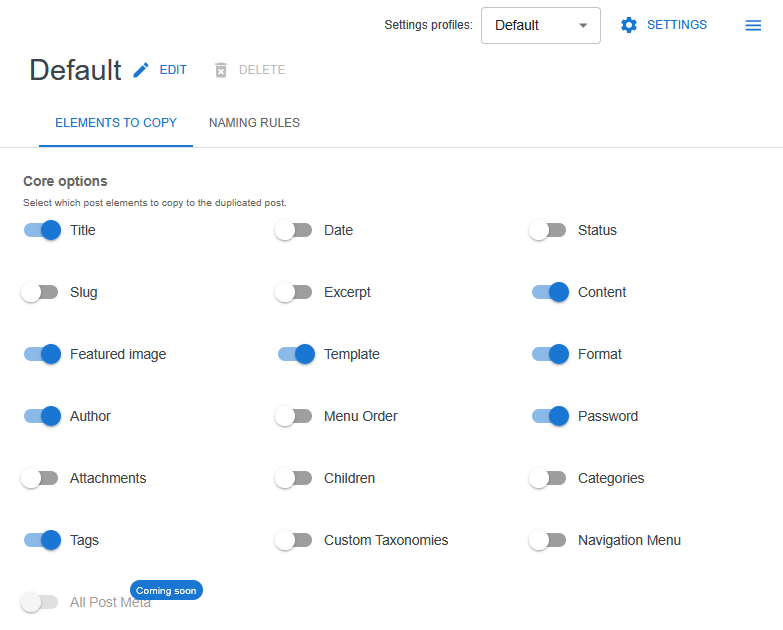
Duplicate Post RB uses duplication profiles to group duplication settings together.
Each profile:
For example:
The Elements to copy settings apply only to the currently selected profile.
Below is a detailed description of each available option in the Elements to copy section.
Copies the post title to the duplicated item.
If disabled, the duplicated post will be created without a title or will rely on naming rules defined in the profile.
Copies the main post content, including blocks, shortcodes, and HTML.
This option should normally be enabled unless you are creating empty drafts or reusable templates.
Copies the post excerpt.
Useful for themes or plugins that rely on manual excerpts for previews or listin
Copies the post slug (URL part).
When enabled, Duplicate Post RB automatically ensures uniqueness to avoid URL conflicts.
Copies the original publication date.
If disabled, the duplicated post will receive the current date.
Copies the post status (published, draft, private, etc.).
If disabled, the duplicated post will be created as a draft.
Copies the featured image (post thumbnail).
This does not duplicate the media file itself — it links the existing image to the duplicated post.
Copies the assigned page template.
Useful when working with custom page templates in themes or page builders.
Copies the post format (standard, gallery, video, etc.), if supported by the theme.
Copies the post author.
If disabled, the duplicated post will be assigned to the current user.
Copies the post password for password-protected content.
Copies the menu order value.
Important for sites that use custom ordering for pages or posts.
Copies media attachments associated with the post.
This does not duplicate files physically, but preserves their relationships.
Copies child pages together with the parent page.
This option is essential for duplicating page hierarchies and complex page structures.
Copies assigned categories.
Typically used for blog posts and content-heavy websites.
Copies post tags.
Can be disabled for content templates or reusable drafts.
Copies all registered custom taxonomies assigned to the post.
Useful when working with custom post types and structured content.
Copies navigation menu assignments, if applicable.
This option is rarely needed and is usually disabled by default.
This approach keeps duplication predictable and reduces manual cleanup.
Build faster, cleaner, and more reliable WordPress websites using lightweight plugins designed for real-world workflows.
Get started now