Share your feature requests anytime
Search icon Our Plugins

Duplicate page hierarchy

Overview

Duplicate Post RB allows you to duplicate entire page hierarchies, including parent pages and all nested child pages.

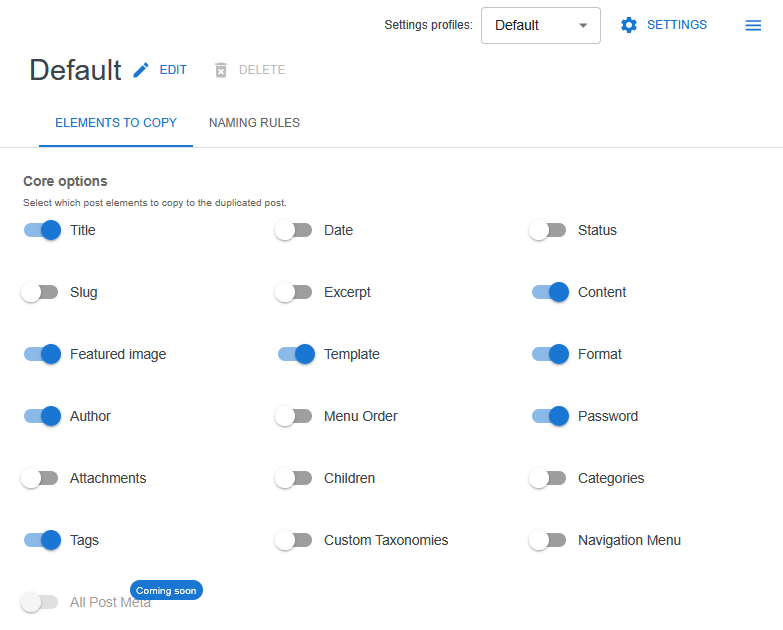
This feature is controlled by the Children option in the Elements to copy section and works on a per-profile basis.


How page hierarchy works in WordPress

In WordPress, pages can be organized into a hierarchical structure:

  • parent pages
  • child pages
  • multiple nesting levels

This structure is commonly used for:

  • landing page groups
  • documentation sections
  • multi-level content trees
  • complex website structures

Enabling hierarchy duplication

To duplicate a page together with its child pages:

  1. Open Duplicate Post RB → Settings
  2. Select the desired duplication profile
  3. Go to Elements to copy
  4. Enable the Children option
  5. Save the profile configuration

Once enabled, hierarchy duplication will apply whenever this profile is used.


What gets duplicated

When the Children option is enabled, Duplicate Post RB will:

  • duplicate the selected parent page
  • duplicate all child pages
  • preserve the original parent–child relationships
  • keep the original page order and structure

The duplicated pages form a new, independent hierarchy.


Using hierarchy duplication

Hierarchy duplication can be triggered from:

  • the Pages list in the WordPress admin
  • the Gutenberg editor
  • the Classic editor
  • the admin bar duplication action

In all cases, you can choose which duplication profile to use before copying.


Profile-based behavior

The Children option is profile-specific.

This allows you to:

  • enable hierarchy duplication only for specific workflows
  • keep it disabled for blog posts or single pages
  • create dedicated profiles for complex page structures

Using profiles helps avoid accidental duplication of large page trees.


Best practices

  • Use a dedicated profile for hierarchy duplication
  • Review child pages before duplicating large structures
  • Combine hierarchy duplication with naming rules to avoid confusion
  • Test duplication on staging sites for very large page trees

Limitations and notes

  • Hierarchy duplication applies only to hierarchical post types (such as Pages)
  • Non-hierarchical post types are not affected
  • Media files are not physically duplicated

Next steps

Simplify your WordPress workflow!

Build faster, cleaner, and more reliable WordPress websites using lightweight plugins designed for real-world workflows.

Get started now