 support@rbplugins.com
Simplify your WordPress workflow!
Build faster, cleaner, and more reliable WordPress websites using lightweight plugins designed for real-world workflows.
Get started now
The General plugin settings section allows you to control global behavior of Duplicate Post RB across the WordPress admin interface.
These settings are not profile-specific and apply to all duplication actions, regardless of which duplication profile is used.
The User preferences section defines which user roles are allowed to duplicate content.
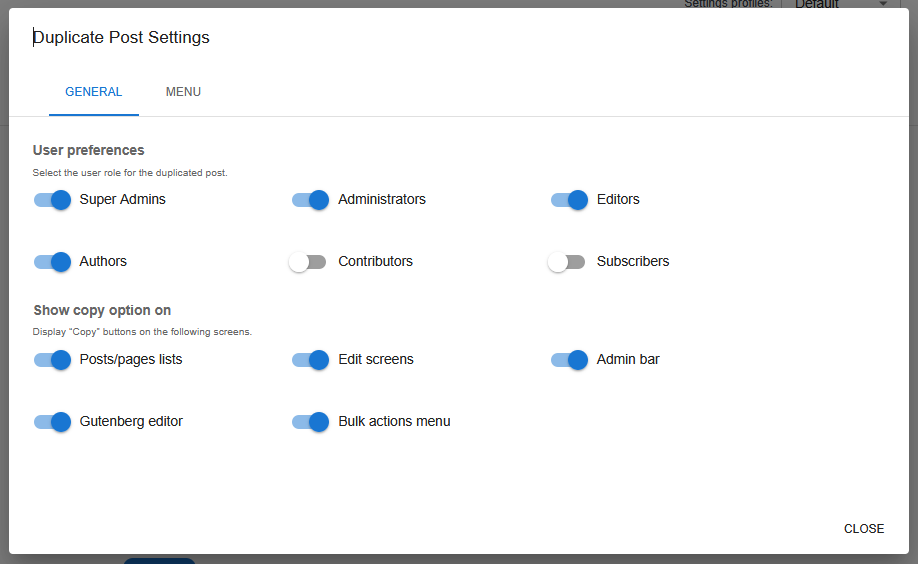
You can enable or disable duplication access for the following roles:
Only users with enabled roles will see copy and duplicate options in the WordPress admin.
This makes it possible to limit duplication functionality to trusted roles and avoid accidental content copying.
The Show copy option on section controls where duplication actions appear in the WordPress admin interface.
You can enable copy buttons in the following locations:
This allows you to tailor duplication access to your preferred workflow and keep the interface clean.
When enabled, duplication options appear directly inside the Gutenberg editor, allowing you to duplicate content without leaving the editor.
The same profile selection and duplication logic is used across all interfaces.
Enabling the Bulk actions menu option allows duplication of multiple posts or pages at once from the list view.
This is useful for managing large amounts of content efficiently.
When enabled, a duplicate option is added to the WordPress admin bar.
This provides quick access to duplication actions from anywhere in the admin interface.
The Menu tab allows you to control where the plugin menu appears in the WordPress sidebar.
When enabled, the plugin’s main menu item is moved from the WordPress sidebar to the Tools section.
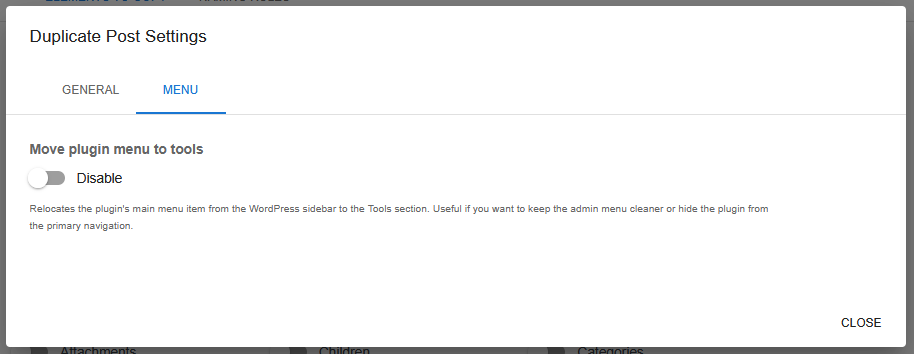
This option is useful if you want to:
Build faster, cleaner, and more reliable WordPress websites using lightweight plugins designed for real-world workflows.
Get started now